

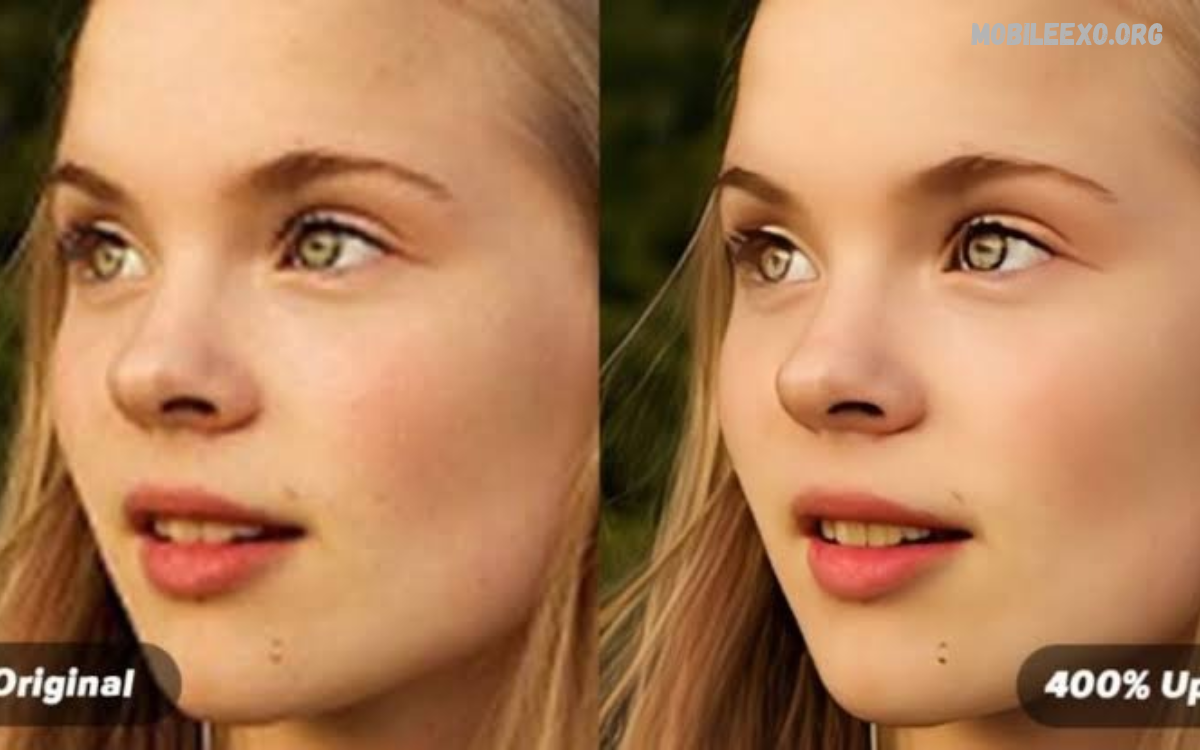
An AI Photo Enhancer Review helps users understand how artificial intelligence improves image quality, sharpness, colors, and details. Modern AI editing tools make photo enhancement easier for beginners and experienced editors.
AI photo enhancers use intelligent algorithms to improve image appearance without requiring advanced editing skills. These tools can help restore old photographs, improve blurry images, adjust lighting, and produce clearer results.
What Is an AI Photo Enhancer?
An AI photo enhancer is an image editing tool that uses artificial intelligence to improve photograph quality. It analyzes image elements such as brightness, color, sharpness, contrast, and visible details.
Unlike traditional editing applications, AI-powered tools can automatically identify areas requiring improvement. Users can upload an image, select an enhancement option, and allow the software to process the photograph.
How AI Photo Enhancer Technology Works
AI photo enhancement technology uses machine learning models trained on large image collections. These models recognize patterns, identify visual imperfections, and estimate how improved image details should appear.
When users upload photographs, the software analyzes their quality and applies suitable adjustments. Depending on the application, processing may include noise reduction, resolution improvement, color correction, and sharpening.
Important Features of AI Photo Enhancer Tools
AI photo enhancement applications include different features designed to improve image quality. Understanding these features helps users choose software that fits their editing needs.
Some applications provide automatic enhancement, while others offer additional controls for portrait editing, background improvement, image restoration, and resolution adjustment.
Automatic Photo Enhancement
Automatic enhancement is one of the most useful features available in AI photo editing applications. It analyzes an image and applies adjustments to improve its overall appearance.
This feature helps beginners achieve better results without manually changing multiple editing settings. Users can compare the original photograph with the enhanced version before saving their work.
Image Resolution Improvement
Low-resolution photographs often look unclear on larger screens. AI image upscaling increases image dimensions while preserving or reconstructing visual details.
This feature can help improve older digital photographs and images intended for larger displays. However, reconstructed details are estimates and may not perfectly represent the original scene.
Blur Reduction
Blurry photographs can result from camera movement, poor focus, or low-quality image sensors. AI-powered sharpening tools attempt to improve visible edges and make important objects appear clearer.
Results depend on the original photograph and the type of blur. Slightly blurry images may improve noticeably, while heavily blurred photographs can remain unclear.
Noise Reduction
Image noise commonly appears as unwanted grain or small visual distortions. It becomes especially noticeable in photographs captured under poor lighting conditions.
AI noise reduction identifies unwanted patterns and attempts to remove them while preserving important details. Effective processing can produce cleaner photographs without making the entire image appear excessively smooth.
Color Correction
Color correction improves image appearance by adjusting saturation, contrast, temperature, and brightness. AI-powered applications can analyze photographs and recommend suitable color improvements.
This feature is useful for photographs that appear too dark, faded, or unnatural. Balanced color adjustments can make images look more consistent and visually appealing.
Old Photo Restoration
Old photographs may contain fading, scratches, discoloration, and other signs of deterioration. AI restoration tools attempt to improve their appearance through automated image processing.
Some applications can also colorize black-and-white photographs. However, automatically generated colors represent estimates rather than verified historical information.
Best AI Photo Enhancer Tools
Different applications offer different enhancement features, editing controls, and pricing options. Choosing the right tool depends on image quality requirements, available devices, and personal preferences.
Some tools focus on professional image enhancement, while others provide simple editing experiences for everyday users. Comparing their features can help identify the most suitable option.
Remini
Remini is a popular AI-powered photo enhancement application known for improving portrait photographs. Its technology focuses on facial details, image clarity, and restoration of older photographs.
The application provides an accessible editing experience for users who want quick improvements. Results can vary depending on the original image, and some enhancements may produce artificial-looking facial details.
Adobe Photoshop
Adobe Photoshop offers advanced image editing features supported by AI-powered tools. Users can combine traditional editing techniques with intelligent features for improving photographs.
It provides extensive control over image adjustments, object editing, and creative effects. Photoshop is particularly suitable for users who want more flexibility and detailed editing options.
Canva
Canva provides accessible photo editing features for beginners, content creators, and designers. Its editing environment combines image adjustments with design tools for creating social media graphics and other visual content.
AI-powered features can simplify certain editing tasks and improve workflow efficiency. Canva is useful for users who want photo enhancement alongside graphic design capabilities.
Fotor
Fotor offers online photo editing features, including AI-powered enhancement and image correction. Its interface is designed to make common editing tasks accessible without requiring extensive technical knowledge.
Users can explore different tools for improving brightness, sharpness, colors, and portraits. Feature availability may depend on the selected subscription and application version.
Picsart
Picsart combines photo editing, creative effects, and AI-powered features in one application. It supports different editing activities, including image enhancement, background editing, and visual design.
The application is useful for social media creators who want to improve photographs and create attractive visual content. Its wide range of editing options provides flexibility for different creative projects.
Benefits of Using AI Photo Enhancer
AI photo enhancement tools provide several benefits for everyday photography. They reduce the effort required for common editing tasks and make image improvement accessible to users with different experience levels.
Their automatic processing capabilities can save time when editing multiple photographs. However, results should always be reviewed to ensure that important details remain natural and accurate.
Saves Editing Time
Traditional photo editing can require several adjustments before achieving the desired result. AI-powered applications simplify this process by automatically analyzing images and applying suitable improvements.
Users can enhance photographs within a shorter period compared with performing every adjustment manually. This makes AI tools useful for people who regularly work with digital images.
Beginner-Friendly Editing
Many photo editing applications include complicated controls that beginners may find difficult to understand. AI enhancement reduces this complexity through automatic processing and simple editing options.
Users can improve photographs without learning advanced techniques. Basic controls also make it easier to experiment with different enhancement settings.
Improves Image Appearance
AI enhancement can improve sharpness, contrast, brightness, and color balance. These adjustments help photographs appear clearer and more visually consistent.
The improvement is particularly useful when working with older photographs or images captured using basic smartphone cameras. However, enhancement cannot guarantee perfect results for every image.
Supports Old Photographs
Digital restoration features can help improve the appearance of family photographs and older collections. AI tools may reduce visible damage, improve contrast, and restore some missing visual information.
These capabilities make digital photo preservation more accessible. Users should keep original copies because automated restoration may introduce inaccurate details.
Multiple Editing Options
Modern AI photo enhancers provide several tools within a single application. Depending on the software, users may access portrait enhancement, noise reduction, color correction, sharpening, and image upscaling.
Having multiple features available can simplify the editing workflow. It also allows users to experiment with different improvements without switching between several applications.
AI Photo Enhancer for Android Users
Android users can access several applications that provide AI-powered image enhancement. These tools are available for different smartphones and offer features suitable for casual photography and content creation.
Before installing an application, users should review its compatibility, storage requirements, permissions, and available editing features. Selecting a suitable application can improve the overall editing experience.
Easy Smartphone Editing
Smartphone editing allows users to improve photographs directly from their devices. They can select an image from their gallery, apply enhancement settings, and review the final result.
This approach is convenient for everyday photography. It also removes the need to transfer photographs to a computer for basic editing tasks.
Portrait Enhancement
Portrait enhancement features focus on improving facial clarity and overall image appearance. Some applications provide options for sharpening facial details, adjusting lighting, and reducing unwanted visual noise.
These tools can help improve personal photographs and profile pictures. Users should avoid excessive enhancement because it may change natural facial details.
Social Media Photography
Content creators often need clear photographs for social media posts, profile images, and promotional graphics. AI enhancement tools can help improve image presentation before publishing.
Balanced brightness, natural colors, and appropriate sharpness can make photographs more suitable for different platforms. Users should also consider the image dimensions required by their intended platform.
AI Photo Enhancer for Professional Photography
Professional photographers can use AI enhancement tools to support their existing editing workflow. These applications can assist with repetitive tasks and provide additional options for improving image quality.
However, AI enhancement should not replace professional judgment. Photographers need to review every adjustment to maintain accurate colors, natural textures, and the intended visual style.
Improving Wedding Photographs
Wedding photography often involves different lighting conditions, backgrounds, and camera settings. AI enhancement can assist with correcting exposure, reducing noise, and improving image clarity.
Photographers can use these features during the editing process to achieve more consistent results. Original photographs should remain available for comparison and quality control.
Product Photography Enhancement
Product photographs require clear details, balanced lighting, and accurate colors. AI enhancement can help improve sharpness and remove some unwanted image noise.
These improvements may support online stores and product presentations. However, sellers should ensure that enhancement does not misrepresent the actual appearance of products.
Landscape Photography
Landscape photographs often contain detailed natural elements, including trees, mountains, buildings, and skies. AI enhancement can improve contrast, sharpness, and color balance across these images.
Moderate adjustments can help preserve a natural appearance. Excessive saturation or artificial sharpening may reduce image quality instead of improving it.
Free vs Paid AI Photo Enhancer
AI photo enhancement applications are available through free and paid plans. Each option offers different features, usage limits, and editing capabilities.
Free versions can be suitable for occasional editing, while paid subscriptions may provide additional tools and higher usage limits. Users should compare available features before purchasing a subscription.
Free AI Photo Enhancer Features
Free applications often include basic enhancement options such as automatic correction, sharpening, brightness adjustment, and limited image restoration.
These features can be sufficient for simple editing requirements. However, some applications restrict image exports, advanced tools, or processing limits in their free versions.
Paid AI Photo Enhancer Features
Paid subscriptions may provide additional enhancement options, improved processing limits, and access to premium editing tools. Some services also offer higher-resolution exports or batch processing.
These features can benefit users who regularly edit photographs. Nevertheless, a paid subscription does not automatically guarantee better results for every image.
Which Option Is Better?
The best option depends on editing frequency and individual requirements. Casual users may find free applications sufficient for improving everyday photographs.
Professional editors and frequent content creators may benefit from premium features. Comparing subscription costs with actual usage can help users make a practical decision.
Limitations of AI Photo Enhancer Tools
Although AI enhancement offers useful capabilities, it also has certain limitations. Understanding these problems helps users maintain realistic expectations and avoid relying completely on automatic processing.
Image quality, processing accuracy, software limitations, and privacy practices can influence the overall experience. Reviewing the final result is important before sharing or publishing enhanced photographs.
Artificial-Looking Details
Some AI applications generate or reconstruct details that were not clearly visible in the original photograph. This can sometimes create unnatural textures, facial features, or background elements.
The problem becomes more noticeable when users apply excessive enhancement. Moderate settings can help maintain a more realistic appearance.
Inaccurate Image Restoration
AI restoration tools estimate missing or damaged information using learned visual patterns. Their results may look convincing without accurately representing the original photograph.
This limitation is important when restoring historical or personal images. Users should preserve original files and avoid treating generated details as verified information.
Internet Requirements
Some AI enhancement services process photographs through online servers. These applications may require a stable internet connection to upload images and complete editing tasks.
Other applications provide certain offline features. Users should check processing requirements before selecting an enhancement tool.
Privacy Concerns
Photo editing applications may request access to image galleries or require uploading photographs for processing. Users should understand how their images are collected, stored, and handled.
Reviewing privacy policies and application permissions can help users make informed decisions. Avoid uploading sensitive photographs to services whose privacy practices are unclear.
Subscription Restrictions
Some applications advertise free enhancement features but restrict certain tools behind paid subscriptions. Watermarks, export limits, and processing restrictions may also affect the editing experience.
Users should review subscription terms before purchasing premium access. Checking cancellation policies can also prevent unexpected charges.
How to Choose the Best AI Photo Enhancer
Choosing the right AI photo enhancer requires understanding your editing needs. Different applications focus on different image types, processing methods, and user experiences.
A suitable application should provide useful enhancement features without making editing unnecessarily complicated. Testing available tools can help users identify software that meets their requirements.
Check Image Quality
Image quality should be the main consideration when comparing AI enhancement applications. Review sample results to understand how each tool handles sharpness, colors, textures, and noise.
Compare original and enhanced photographs using similar viewing conditions. This makes it easier to identify genuine improvements and unwanted visual changes.
Review Available Features
Different applications provide different enhancement capabilities. Some focus on portrait restoration, while others offer general image correction, upscaling, and noise reduction.
Select an application that includes the features you actually need. Avoid paying for advanced tools that you rarely use.
Read Also: Best Free AI Apps Review: Top AI Tools for Everyday Use
Consider Ease of Use
A simple interface can make photo editing more convenient, especially for beginners. Clear settings, understandable controls, and preview options help users manage the enhancement process.
Professional users may prefer applications with more manual controls. The best interface depends on experience level and editing requirements.
Compare Pricing
Pricing is another important factor when selecting an AI photo enhancer. Some applications offer free access, while others require subscriptions or individual payments.
Compare the available plans and identify any usage restrictions. Choose an option that provides useful features within your budget.
Tips for Getting Better Results With AI Photo Enhancer
Using AI enhancement correctly can improve the final appearance of photographs. A few simple editing practices can help users avoid excessive processing and maintain natural image quality.
The original photograph should always be treated as the foundation for editing. Small adjustments and careful comparisons usually produce more reliable results than applying every available enhancement feature.
Start With the Original Image
Always keep an original copy before applying AI enhancement. This allows users to compare changes and restore the photograph if the results are unsatisfactory.
Working with an original file also helps preserve the highest available image quality. Avoid repeatedly saving and editing compressed versions whenever possible.
Use Moderate Enhancement Settings
Excessive sharpening, saturation, and noise reduction can make photographs appear unnatural. Start with moderate settings and increase adjustments only when necessary.
Review the image at different zoom levels to identify unwanted changes. Natural textures and realistic colors should remain a priority.
Select High-Quality Images
AI enhancement generally works better when the original photograph contains sufficient visual information. Images with reasonable lighting and visible details provide a stronger starting point.
Very small or heavily damaged photographs may produce inconsistent results. Selecting the best available original file can improve the editing experience.
Compare Before and After Results
Most enhancement applications provide a preview option for comparing edited photographs. Use this feature to determine whether the changes genuinely improve the image.
Check facial details, backgrounds, colors, and important objects. Save the enhanced version only when the final result meets your expectations.
AI Photo Enhancer for Social Media Content Creators
Social media creators regularly publish photographs, promotional graphics, and visual content. AI enhancement tools can help improve image presentation while reducing the time spent on basic editing.
These tools are useful for preparing profile photographs, thumbnails, product images, and other visual materials. Consistent image quality can also support a recognizable content style.
Instagram Photo Enhancement
Instagram content often includes portraits, lifestyle photographs, travel pictures, and promotional images. AI enhancement can improve brightness, color balance, and overall clarity before publishing.
Creators should maintain natural editing styles rather than applying excessive filters. Consistent adjustments can help photographs look more professional across a social media profile.
YouTube Thumbnail Editing
YouTube thumbnails need clear subjects and easily recognizable visual elements. AI enhancement can improve photograph sharpness and help important objects stand out.
Creators can combine image enhancement with graphic design tools to prepare attractive thumbnails. The final design should remain clear and readable on smaller screens.
Facebook Photo Editing
Facebook users share personal photographs, business images, and promotional graphics. AI-powered enhancement can improve the presentation of these images before sharing.
Simple improvements to lighting, contrast, and sharpness can make photographs easier to view. Users should choose export settings suitable for their intended use.
AI Photo Enhancer vs Traditional Photo Editing
Traditional photo editing relies heavily on manual adjustments, allowing users to control individual image properties. AI enhancement automates many of these tasks by analyzing photographs and recommending changes.
Both approaches offer useful capabilities. The right choice depends on the desired level of control, available editing experience, and complexity of the photograph.
Editing Speed
AI-powered tools can complete many common enhancement tasks automatically. This reduces the time required for repetitive adjustments and makes basic editing more convenient.
Traditional editing may require more manual work, especially when handling complex images. However, experienced editors can create precise adjustments through detailed controls.
Creative Control
Traditional editing applications generally provide extensive manual control over image properties. Users can adjust individual areas and apply specific effects according to their creative goals.
AI enhancement focuses more on automated improvements. Some applications provide manual controls, but their main advantage remains simplified image processing.
Final Image Quality
Both approaches can produce high-quality results when used correctly. AI tools can improve certain image imperfections, while traditional editing provides greater control over individual adjustments.
Combining both methods can create a flexible workflow. Users can apply AI enhancement first and then make final corrections manually.
Future of AI Photo Enhancement Technology
AI photo enhancement continues to develop as machine learning and image processing technologies improve. Newer tools are becoming more capable of recognizing objects, adjusting image quality, and automating complicated editing tasks.
Future applications may provide more accurate restoration, improved resolution processing, and better control over generated details. However, accuracy, transparency, and responsible image editing will remain important considerations.
Smarter Image Restoration
Future restoration systems may become better at identifying scratches, fading, and missing visual information. Improved models could provide more consistent results across different types of old photographs.
These developments may make digital photo preservation easier. Human review will still be necessary when historical accuracy matters.
Improved Mobile Editing
Mobile AI editing applications may continue introducing faster processing and more advanced features. Better smartphone hardware could also support additional image processing directly on devices.
This development could make advanced enhancement more accessible. Users may benefit from convenient editing experiences without relying entirely on desktop software.
More Accurate Image Enhancement
Improved AI models may become better at preserving original textures and recognizing important image details. This could reduce some common problems associated with artificial-looking enhancement.
However, generated details will still require careful evaluation. Users should understand the difference between improving existing information and creating estimated visual content.
Who Should Use an AI Photo Enhancer?
AI photo enhancement tools can benefit different types of users. Their usefulness depends on photography habits, editing requirements, and expectations about image quality.
Beginners may appreciate automatic adjustments, while professional editors can use AI features to support more detailed workflows. Selecting suitable software is more important than choosing an application simply because it includes AI technology.
Beginners
Beginners can use AI enhancement to improve photographs without learning complicated editing techniques. Automatic processing makes common adjustments easier to understand.
Simple interfaces also allow new users to experiment with different image improvements. This makes AI enhancement a practical starting point for smartphone photography.
Content Creators
Content creators can use AI tools to prepare photographs for websites, social media platforms, and promotional materials. Faster editing can help them manage regular publishing schedules.
Different enhancement features also provide flexibility for portraits, product images, and visual content. Reviewing the final image remains important before publishing.
Professional Photographers
Professional photographers may use AI enhancement for noise reduction, restoration, and repetitive editing tasks. These features can support existing workflows and reduce time spent on certain adjustments.
However, professionals should maintain control over color accuracy, textures, and final image presentation. AI tools work best when used as part of a broader editing process.
Frequently Asked Questions
What Is an AI Photo Enhancer?
An AI photo enhancer is software that uses artificial intelligence to improve image quality. It can adjust sharpness, brightness, colors, resolution, and other visual elements.
How Does an AI Photo Enhancer Work?
AI photo enhancers analyze photos using machine learning. They identify image imperfections and apply automated improvements based on learned visual patterns.
Which AI Photo Enhancer Is Best?
Remini, Adobe Photoshop, Canva, Fotor, and Picsart offer different enhancement features. The best app depends on your editing needs and personal preferences.
Can AI Enhance Blurry Photos?
AI tools can improve some blurry photographs by sharpening visible edges and reconstructing estimated details. However, heavily blurred images may not become completely clear.
Are AI Photo Enhancers Free?
Some AI photo enhancers offer free editing features. Others provide limited free access and require subscriptions for advanced tools or higher-resolution exports.
Can AI Improve Old Photographs?
Yes, AI restoration tools can improve faded photographs and reduce certain visible imperfections. Some applications also offer colorization and detail reconstruction features.
Are AI Photo Enhancers Safe?
Many AI photo enhancers are designed for regular image editing, but privacy practices differ. Users should review application permissions and privacy policies before uploading personal photographs.
Can AI Increase Photo Resolution?
AI upscaling tools can increase image dimensions while estimating additional visual details. However, the generated information may not match the original photograph perfectly.
Do AI Photo Enhancers Work on Android?
Yes, several AI photo enhancement applications support Android smartphones. Users should check device compatibility, application permissions, and available features before installation.
Is AI Photo Enhancement Better Than Traditional Editing?
AI enhancement offers faster automated processing, while traditional editing provides more manual control. Combining both methods can provide flexibility and effective results.
Conclusion
This AI Photo Enhancer Review shows how artificial intelligence can simplify photo editing and improve the appearance of digital photographs. Features such as automatic enhancement, noise reduction, image sharpening, and photo restoration provide useful options for different editing requirements.
Apps like Remini, Photoshop, Canva, Fotor, and Picsart offer different approaches to improving images. The best choice depends on editing needs, available features, pricing, and personal preferences.

1 Comment
Pingback: Portrait Editing App Review: Features, Tools, Benefits, and Best Editing Options - Mobileexo