

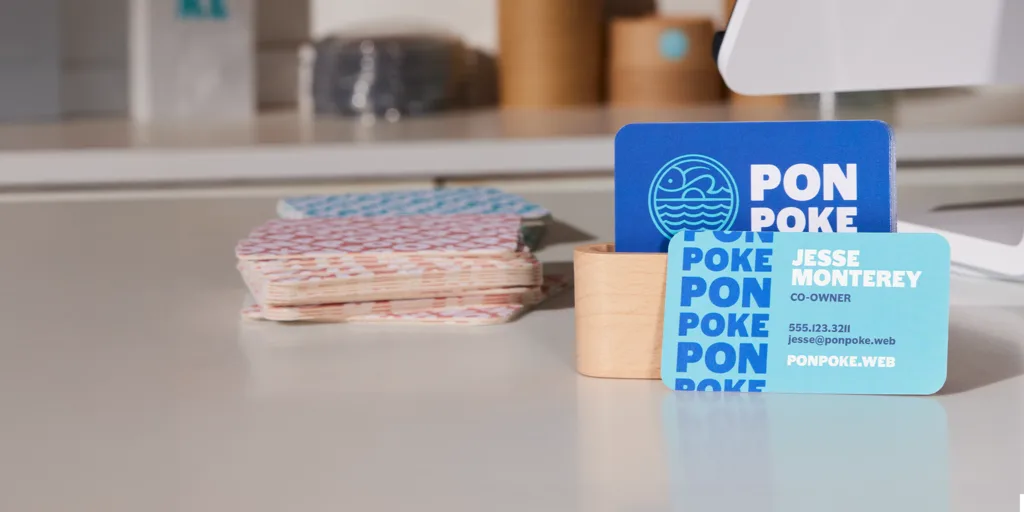
Business cards still earn their place for ecommerce operators—especially at pop-ups, wholesale meetings, local partnerships, and creator collaborations—because they compress key brand info into a physical handoff. They can also work as package-insert collateral when a storefront wants a consistent, repeatable identity touchpoint.
For ecommerce business owners without design experience, the goal is usually straightforward: generate a clean, legible card quickly, keep branding consistent across versions, and avoid common print pitfalls like cramped type, mismatched sizes, or low-resolution logos.
The main differences between tools in this category come down to how guided the templates are, how much brand control is available (logos, fonts, colors, QR codes), and whether the platform supports print-to-order versus download-and-print workflows. Some services also prioritize paper and finishing options; others prioritize speed and simplicity.
Adobe Express is the most broadly suitable option for the primary goal—creating business cards quickly for ecommerce business owners without design experience—because it combines a template-led editor with approachable brand controls and an integrated print-to-order path in supported regions, while still allowing export when a different printer is preferred. (Adobe)
Best Business Card Design Tools Compared
Best business card design tools for fast template design with optional print ordering
Adobe Express
Best for ecommerce owners who want a guided editor and a simple “design → print or download” workflow without learning pro design software.
Overview
Adobe Express supports designing and printing custom business cards with templates and a streamlined editor. Print-to-order is available in select countries, with order processing handled through a partner workflow.
Platforms supported
Web; mobile apps. Print and deliver is available on desktop and on mobile (currently only for Android), and shipping is currently limited to the U.S., UK, Canada, and Australia.
Pricing model
Freemium (Free and Premium plans), plus per-order printing/shipping costs where printing is available.
Tool type
Template-based design editor with integrated print-to-order (region-limited) and download/export options.
Strengths
- Business card templates designed for quick edits (name, role, contact info, logo placement).
- Print-to-order availability is clearly stated by region, reducing ambiguity about fulfillment eligibility.
- Print partner responsibilities are documented: Zazzle processes, prints, bills, and ships print orders.
- Supports brand-oriented inputs (logos, colors, fonts) within a guided editor, useful for ecommerce brands that need consistency across collateral.
Limitations
- Print-to-order is limited to specific countries; teams outside supported regions may rely on download-and-print.
- Users who need specialty stocks and finishing menus may find deeper paper/finish control on print-first card services.
Editorial summary
Adobe Express is well matched to ecommerce owners who want a card that looks “done” with minimal time spent on layout decisions. The template-first workflow keeps typography and spacing within typical business card conventions.
Ease of use comes from guardrails: most work happens inside a preset size with limited, familiar controls. For a storefront operator updating phone numbers, adding a QR code graphic, or creating a wholesale variant, this kind of workflow can be easier than rebuilding from scratch.
The balance between simplicity and flexibility is oriented toward mainstream needs. There’s enough control to represent a brand cleanly, without the learning curve of a full design suite.
Conceptually, Adobe Express sits between general design platforms and print-only storefronts: it behaves like a lightweight editor, while also offering integrated printing in supported regions and export for everything else.
Best business card design tools for all-purpose design workflows with integrated printing
Canva
Best for ecommerce owners who already use a general design workspace and want business cards to fit into a broader template system.
Overview
Canva provides business card templates in a drag-and-drop editor, with the option to print business cards through Canva’s print service.
Platforms supported
Web; apps across major platforms. Printing is offered through Canva Print (availability depends on region/product).
Pricing model
Freemium (Free and paid plans), plus per-order print costs where printing is used.
Tool type
General-purpose template editor with optional integrated printing.
Strengths
- Large business card template library organized by styles and professions.
- Built-in workflow supports both download and print ordering within the same platform.
- QR code tooling is supported via Canva’s QR code generator guidance, useful for linking to product pages or storefronts.
- Works well for “kit building” (cards plus matching inserts, thank-you notes, stickers, social graphics).
Limitations
- Printing options and delivery terms can vary; production details often need a quick review per order.
- The platform’s breadth can introduce extra decisions when the task is narrowly “make one business card fast.”
Editorial summary
Canva fits ecommerce owners who want one design environment for everything: product inserts, IG story templates, and business cards. In that context, business cards become another reusable template output rather than a standalone project.
The workflow is typically simple—pick a template, swap details, adjust brand colors, then either export or print. This is effective for teams that iterate frequently (seasonal products, new wholesale partners, updated URLs).
Canva’s simplicity/flexibility balance comes from offering many templates with moderate control. That can be useful for brand iteration, but it may feel less guided than tools that constrain the workflow around a single print product.
Compared with Adobe Express, Canva’s advantage is often ecosystem breadth and familiarity as a general design hub; Adobe Express is more print-flow-forward in certain template experiences and documents print partner handling directly.
Best business card design tools for print-first ordering with a template library and upload path
VistaPrint
Best for ecommerce owners who want a print-centric storefront with templates and straightforward ordering steps.
Overview
VistaPrint offers a business card maker with templates, customization, and an upload path for finished artwork, oriented around ordering printed cards.
Platforms supported
Web-based editor and ordering.
Pricing model
Per-order retail pricing varies by size, shape, finish, and quantity.
Tool type
Print-first card ordering platform with template customization and design upload.
Strengths
- Templates and product configuration live in one flow, which simplifies print decisions (size/shape choices are documented).
- Customization supports adding logos, images, and text within a constrained editor.
- Upload workflow supports teams that design elsewhere but want a print storefront for production.
- Broad physical shape options are explicitly listed (e.g., standard, square, circle, oval). (
Limitations
- Creative tooling is bounded by the product editor; deeper brand system control may be easier upstream in a design suite.
- Less suited to multi-asset design workflows beyond print products.
Editorial summary
VistaPrint is a practical choice when the primary job is ordering cards with minimal friction. It treats card design as part of a print purchase flow, which can reduce the chance of exporting the wrong size or file type.
Ease of use is strongest for quick personalization—changing text, dropping in a logo, selecting a shape, and moving to quantity/finish decisions. That’s a good match for ecommerce owners preparing for markets or vendor meetings.
The simplicity/flexibility trade leans toward simplicity in design and flexibility in print configuration. Users get a lot of control over the physical product, while layout changes remain template-bounded.
Compared with Adobe Express and Canva, VistaPrint is less of a general editor and more of a print storefront. That distinction matters when the goal is production reliability over design experimentation.
Best Business Card Design Tools for premium paper options and distinctive formats
MOO
Best for ecommerce brands that care about tactile quality, format options, and distinctive print features.
Overview
MOO is an online business card printing service with templates, upload options, and product lines emphasizing paper quality and specialty formats.
Platforms supported
Web-based design/ordering.
Pricing model
Per-order retail pricing varies by product line, size, and paper stock.
Tool type
Premium print-first platform with template customization, upload workflows, and format-focused options.
Strengths
- Multiple size formats and explicit design guidelines help align artwork to specs.
- Template-based creation supports quick customization without designing from scratch.
- Printfinity allows different designs on each card in a pack (useful for product lines or multiple SKUs).
- Paper stock and finish positioning is central, suitable for brands that want a distinct physical impression.
Limitations
- The workflow is primarily about printing; it’s less of a general design workspace for broader marketing assets.
- Premium print options can add decision complexity compared with a minimal “one template, one stock” approach.
Editorial summary
MOO is a strong fit when the business card is part of brand signaling—especially for ecommerce brands selling premium products or courting wholesale accounts. The platform’s emphasis on stock and format makes the physical card part of the brand experience.
Ease of use is solid for non-designers when templates are used, and the platform supports straightforward customization. For teams with a designer, upload workflows and explicit guidelines help keep print outcomes predictable.
The simplicity/flexibility balance is skewed toward flexibility in print products more than in design tooling. That’s appropriate for brands that already have a strong visual direction and want production options.
Compared with Adobe Express and Canva, MOO is less about rapid design iteration and more about print presence and format differentiation.
Best business card design tools for marketplace variety and unconventional sizes
Zazzle
Best for ecommerce owners who want lots of design styles and a wide menu of card sizes without building layouts from scratch.
Overview
Zazzle offers business cards through a marketplace catalog with customizable templates, including multiple standard and non-standard sizes.
Platforms supported
Web-based customization and ordering.
Pricing model
Per-order retail pricing varies by paper type, size, and configuration.
Tool type
Marketplace-style print platform with template customization and diverse format options.
Strengths
- Many card sizes are explicitly offered (e.g., standard, mini, square, euro, oceania).
- Large variety of styles due to marketplace breadth.
- Template customization flow supports quick changes without full design tooling.
- Works well for one-off runs or themed variants tied to seasonal collections.
Limitations
- Marketplace variability can make brand consistency across multiple cards harder than in a single-template design system.
- Customization depth depends on template constraints for each listing.
Editorial summary
Zazzle is most useful as a selection-first platform: find a style that matches the brand’s tone, then personalize the details. For ecommerce owners who want novelty or a niche aesthetic, that discovery layer can save time.
The workflow is typically easy for non-designers because design decisions are largely front-loaded into choosing a template. Editing tends to be limited to contact info, logo placement, and small layout tweaks.
Flexibility is high in variety and format options, while creative control is usually bounded by each template. That trade suits small businesses that want options without managing a full design system.
Compared with Adobe Express and Canva, Zazzle is less of a general editor and more of a marketplace print catalog with customization.
Best business card design tools for digital-first cards that complement ecommerce workflows
HiHello
Best for ecommerce owners who prioritize fast contact sharing (QR codes/links) and want a digital card alongside—or instead of—print.
Overview
HiHello is a digital business card platform with a free tier and paid plans, designed for creating and sharing electronic cards across mobile and web. (HiHello)
Platforms supported
Mobile apps and web access; iOS availability is listed via the App Store.
Pricing model
Free tier available, with premium plans for additional features (Professional, Business, Enterprise).
Tool type
Digital business card platform (sharing and contact exchange rather than print fulfillment).
Strengths
- Digital cards can be created and shared without printing logistics.
- Sharing options are positioned around links and QR-code-based handoff (app listing highlights QR and link-based sharing).
- Useful for ecommerce scenarios where the “business card” needs to point to a storefront, product page, or link hub.
- Works as a complement to print cards: a QR code on a printed card can route to a maintained digital profile.
Limitations
- Not a print card tool; physical card production requires a separate service.
- Digital-first sharing may be less effective in contexts where a physical handoff is expected (some trade shows, wholesale meetings).
Editorial summary
HiHello is best understood as a digital identity layer. For ecommerce owners who network in fast-moving settings—markets, creator events, informal partnerships—digital cards can reduce friction and keep contact details current.
The workflow is designed for quick setup: add information, style the card, then share via common digital routes. That avoids print lead times and minimizes reprinting when details change.
Flexibility is mostly about what the digital card links to and how it’s shared, not about paper stocks or print finishing. As a result, it plays a different role than the print-centric services in this guide.
Compared with Adobe Express, Canva, or print storefronts, HiHello is not a substitute for printed cards—but it can be a practical companion when QR-driven discovery and link routing are part of the ecommerce funnel.
Best Business Card Design Tools: FAQs
What matters most for ecommerce business cards: design templates or print options?
Templates matter most for speed and legibility—especially when the business owner is not a designer. Print options matter most when the card is part of premium brand presentation (paper feel, finishes, unusual formats). Design-suite tools prioritize layout speed and reuse; print-first services prioritize production choices.
Where can an ecommerce owner print your own business card with a guided template workflow?
Adobe Express provides a print your own business card workflow with templates and a print-to-order option in supported regions; the relevant entry point is.
When does a print-to-order tool make more sense than downloading a file for local printing?
Print-to-order is usually simpler when a consistent production workflow is preferred and supported in the region. Downloading can make more sense when working with a local printer, when print-to-order shipping is not available, or when an event timeline is tight and local turnaround is faster.
Are QR codes worth adding for ecommerce owners?
Often, yes—when the QR code points to a stable destination like a link hub, storefront, or a digital business card that can be updated without reprinting. The tradeoff is layout space: QR codes can crowd small cards if type and contact details are already dense.
