

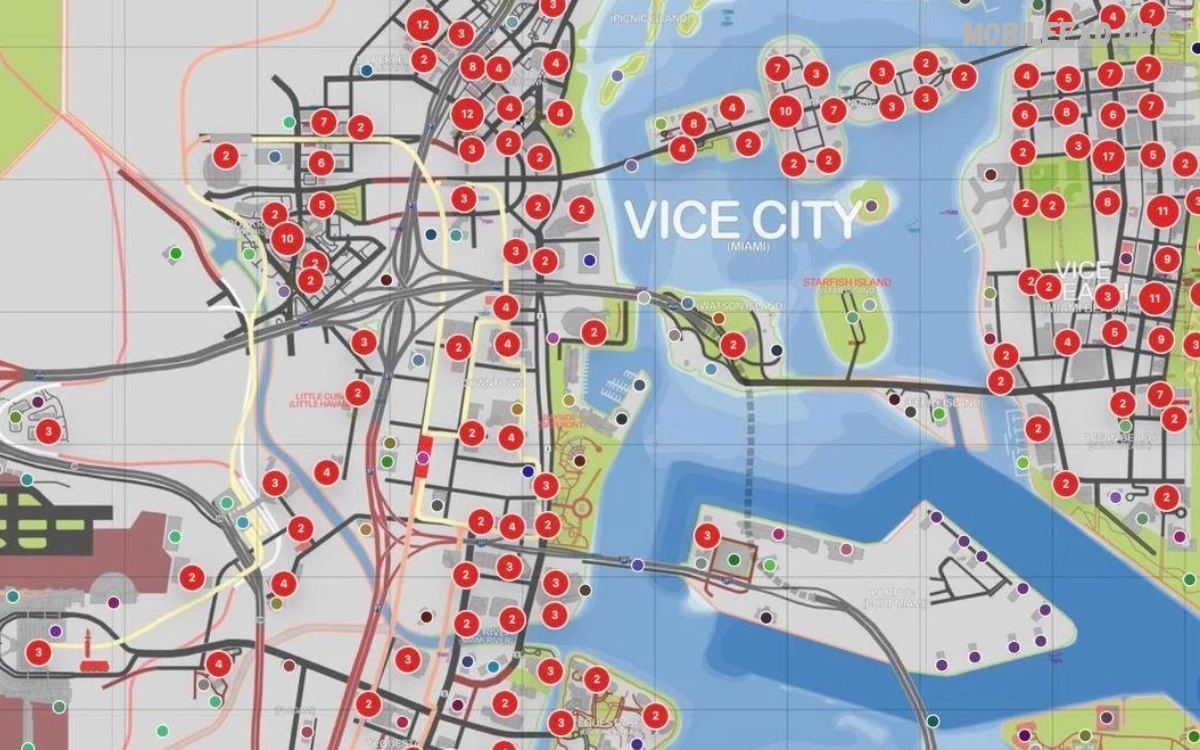
The GTA Mobile Map Guide helps players explore open-world environments, discover key locations, complete missions, and enjoy exciting adventures on mobile. Grand Theft Auto games feature detailed maps with busy streets, residential areas, airports, beaches, shops, and hidden spots.
Understanding the map makes gameplay easier and more enjoyable. Whether you’re exploring GTA San Andreas, GTA Vice City, or GTA Liberty City Stories, knowing where important landmarks are helps players navigate the city, find activities, and progress through the game.
What Is a GTA Mobile Map Guide?
A GTA Mobile Map Guide explains the locations, roads, districts, landmarks, and activities available in a Grand Theft Auto mobile game. Each game features its own map design, environment, and exploration opportunities, so knowing the map helps both beginners and experienced players.
Players can use map knowledge to reach mission locations, discover useful vehicles, locate safehouses, and explore unfamiliar neighborhoods. A clear understanding of the game world also helps reduce unnecessary driving and makes free-roam gameplay more convenient.
Understanding GTA Mobile Map Locations
GTA mobile maps contain different districts connected through roads, bridges, highways, and other travel routes. Urban areas often feature shops, buildings, traffic, and mission destinations, while rural areas may include mountains, countryside roads, and remote settlements.
Learning the layout of these areas helps players identify the quickest routes between destinations. Landmarks such as tall buildings, bridges, stadiums, and waterfronts can serve as useful navigation points when the player needs to travel across a large map.
GTA San Andreas Mobile Map Guide
GTA San Andreas features a large open world with three major cities, surrounding countryside, deserts, forests, and mountain regions. Its broad environment gives mobile players many opportunities to explore different landscapes and discover activities beyond the main storyline.
The map connects Los Santos, San Fierro, and Las Venturas through highways, rural roads, and smaller settlements. Understanding these connections helps players travel efficiently, reach mission destinations, and experience the different environments available throughout San Andreas.
Los Santos Map
Los Santos is a major city inspired by Los Angeles, featuring residential neighborhoods, commercial districts, highways, and recognizable urban landmarks. Players can explore streets, visit useful locations, and travel between different parts of the city during missions or free-roam activities.
Learning the main roads and neighborhood layout makes navigation more convenient. Players can also identify nearby garages, shops, and mission locations while exploring the city, helping them spend less time searching for destinations.
San Fierro Map
San Fierro is a coastal city inspired by San Francisco, featuring steep roads, waterfront districts, bridges, and distinctive urban scenery. Its varied terrain makes driving an important part of exploration, especially when traveling between elevated neighborhoods and waterfront areas.
Players can use major roads and recognizable landmarks to understand the city’s layout. Exploring different districts also reveals mission destinations, vehicle locations, and interesting viewpoints that add variety to the gameplay experience.
Las Venturas Map
Las Venturas is a desert city inspired by Las Vegas, known for its casino district, broad roads, and surrounding desert landscape. The city offers a different atmosphere from Los Santos and San Fierro, with distinctive buildings and open spaces.
Understanding the roads around the casino district helps players reach important destinations more efficiently. The surrounding desert also provides opportunities for exploration, long drives, and discovering locations away from busy urban streets.
GTA Vice City Mobile Map Guide
GTA Vice City features a colorful coastal environment inspired by Miami during the 1980s. Its map includes urban districts, beaches, waterfront roads, commercial areas, and distinctive architecture that gives the city its recognizable appearance.
Players can explore the city by car, motorcycle, or other available vehicles. Learning the main routes between districts helps with missions, property visits, and general exploration while making it easier to recognize familiar landmarks.
Vice City Beach Areas
The beach areas offer scenic roads, waterfront buildings, open spaces, and access to several recognizable locations. Players can enjoy free-roam driving while exploring the coastal environment and discovering activities throughout the surrounding districts.
Coastal roads can also help players understand the relationship between different neighborhoods. Recognizing beachside landmarks makes it easier to navigate when moving between mission destinations and nearby commercial areas.
Downtown Vice City
Downtown Vice City contains urban streets, commercial buildings, and recognizable landmarks. This area can become important during missions because players frequently travel through developed districts to reach objectives or interact with different parts of the city.
Learning the main intersections and nearby roads helps reduce navigation mistakes. Players can also use tall buildings and distinctive structures as reference points when exploring unfamiliar streets.
GTA Liberty City Stories Mobile Map Guide
GTA Liberty City Stories takes place in Liberty City, an urban environment featuring dense neighborhoods, busy roads, bridges, and industrial districts. The map emphasizes city exploration, with different areas connected through road networks and recognizable urban landmarks.
Players can improve navigation by learning the main routes between districts. Exploring the city carefully also helps identify mission destinations, useful services, and alternative roads when traffic or unfamiliar intersections make travel difficult.
How to Use the GTA Mobile Map Effectively
Using the in-game map effectively helps players reach destinations without repeatedly searching through unfamiliar streets. Most GTA mobile games provide a map or navigation interface that displays the surrounding environment and helps players understand their position.
Open the map when beginning a mission or traveling to an unfamiliar location. Study nearby roads, bridges, and recognizable landmarks before driving, then follow the available navigation guidance while paying attention to turns and intersections.
Finding Missions on the GTA Mobile Map
Mission locations are important map destinations because they advance the storyline and unlock additional activities. Depending on the GTA game, mission markers may appear as letters, symbols, icons, or other visual indicators on the map.
Check the map whenever a new mission becomes available. Identifying the destination before traveling can help players select a suitable route and avoid unnecessary detours through unfamiliar districts.
Finding Safehouses and Save Locations
Safehouses provide useful locations in several GTA games, allowing players to access specific facilities or save their progress where supported. Their features vary by title, so players should check the available options within the particular game they are playing.
Learning the locations of owned properties can make exploration more convenient. Players can use familiar safehouses as reference points when traveling across the map, preparing for missions, or returning to a known area after exploring distant locations.
Finding Garages and Vehicle Locations
Garages can be valuable locations for storing vehicles in GTA games that support vehicle storage. Knowing where garages are helps players organize their vehicles and return to familiar places after missions or exploration.
Vehicle availability varies by game and location. Players should explore nearby streets, parking areas, and designated vehicle locations to find suitable transportation, but remember that some vehicles may only appear during specific missions or gameplay situations.
Read Also: GTA Mobile Gameplay Tips: Essential Tricks for Better Gaming
Discovering Hidden Locations on the GTA Mobile Map
GTA games often reward exploration through unusual landmarks, remote areas, hidden collectibles, and locations that are easy to overlook during the main storyline. These discoveries can make free-roam gameplay more engaging and encourage players to explore beyond familiar roads.
Examine less-traveled streets, countryside paths, waterfront areas, and unusual buildings. Some locations may contain collectibles or activities, while others simply provide scenic viewpoints and interesting places to explore throughout the game world.
GTA Mobile Map Navigation Tips
Good navigation begins with understanding the destination before starting a journey. Players should identify major roads, nearby landmarks, and possible alternative routes rather than relying entirely on quick turns or unfamiliar shortcuts.
Pay attention to bridges, tunnels, highway entrances, and connections between districts. These features can make a significant difference when crossing large maps, especially in games with extensive countryside or several separated urban areas.
Exploring the GTA Mobile Map Without Missions
Free-roam exploration lets players discover the game world at their own pace without following a specific storyline objective. This approach can reveal interesting neighborhoods, scenic roads, unusual buildings, and locations that might otherwise remain unnoticed.
Choose a district and explore its streets, nearby landmarks, and surrounding roads. Players can also experiment with different vehicles and discover alternative routes, making the open world feel more familiar before starting difficult missions.
Best Vehicles for GTA Mobile Map Exploration
Choosing a suitable vehicle can make exploring large maps more comfortable. Cars work well on regular roads, motorcycles offer flexibility in busy streets, and certain off-road vehicles are useful when traveling across rough terrain in games that include them.
Vehicle handling varies between GTA titles, so players should select transportation that suits the environment. A reliable vehicle with manageable controls can help reduce crashes and make long journeys through unfamiliar locations more enjoyable.
GTA Mobile Map Guide for Beginners
Beginners should start by learning the immediate surroundings before exploring the entire game world. Identifying nearby roads, mission markers, shops, and safehouses creates a useful foundation for navigating larger districts.
Explore gradually and pay attention to recognizable landmarks. As the map becomes more familiar, players can travel farther, discover additional activities, and complete missions with greater confidence without feeling overwhelmed by the size of the environment.
Common GTA Mobile Map Problems and Solutions
Players may sometimes struggle to locate mission markers, understand unfamiliar roads, or identify the correct route to a destination. These problems often occur when navigating too quickly or overlooking nearby map symbols.
Pause when necessary and inspect the map carefully. Confirm the destination, look for connecting roads, and use visible landmarks to check your direction. If the map interface behaves unexpectedly, check the game’s settings and ensure the application is running correctly.
GTA Mobile Map Graphics and Mobile Performance
Map exploration can feel different depending on the phone’s performance, screen size, and graphics settings. Some devices can display detailed environments smoothly, while others may need adjusted settings to keep gameplay comfortable.
Keep the game updated through an official distribution source and close unnecessary background applications if performance becomes inconsistent. Adjust supported graphics options when available, and use the game’s navigation interface at a comfortable viewing size to make exploring easier.
Frequently Asked Questions
What Is the Best GTA Mobile Map?
The best map depends on personal preference and the GTA title being played. GTA San Andreas offers a large world with multiple cities and countryside, while GTA Vice City provides a compact coastal environment with distinctive urban scenery.
Can I Explore the Entire GTA Mobile Map?
Many GTA mobile games allow extensive free-roam exploration, although access to certain areas may depend on story progression or game-specific restrictions. Exploring new districts gradually helps players learn the environment and discover available activities.
How Can I Find Mission Locations on the Map?
Open the in-game map and look for mission markers or destination symbols. Their appearance varies by GTA title, so check the map legend and current mission instructions to identify the correct location.
Does Every GTA Mobile Game Have the Same Map?
No. Each GTA game has its own world, districts, landmarks, and navigation features. San Andreas, Vice City, and Liberty City Stories offer different environments, so players should use a guide specific to the game they choose.
Can I Find Hidden Places Using the GTA Mobile Map?
Yes, exploring the map can help reveal hidden collectibles, unusual landmarks, and remote locations in games that include them. Some discoveries require exploring beyond main roads or visiting places off common mission routes.
Is a GTA Mobile Map Guide Useful for Beginners?
Yes, a map guide helps beginners understand districts, locate missions, recognize landmarks, and travel between destinations. Learning the basic layout early makes exploration and mission completion easier.
Conclusion
The GTA Mobile Map Guide helps players understand important locations, navigate unfamiliar roads, discover hidden areas, and explore the open worlds featured in Grand Theft Auto mobile games. Learning the map can improve mission preparation and make free-roam gameplay more enjoyable.
Whether exploring the cities of San Andreas, the coastal districts of Vice City, or the urban streets of Liberty City, players benefit from recognizing landmarks and understanding road connections.
